

Crash is back, and it’s time to run, jump, and spin your way through some wild levels. On PC, knowing which key does what makes all the difference between nailing a tricky jump or face‑planting into a pit. Here’s a simple guide to the default controls so you can focus on smashing crates, grabbing masks, and having a blast.
All PC Settings
PC Controls (Keyboard)
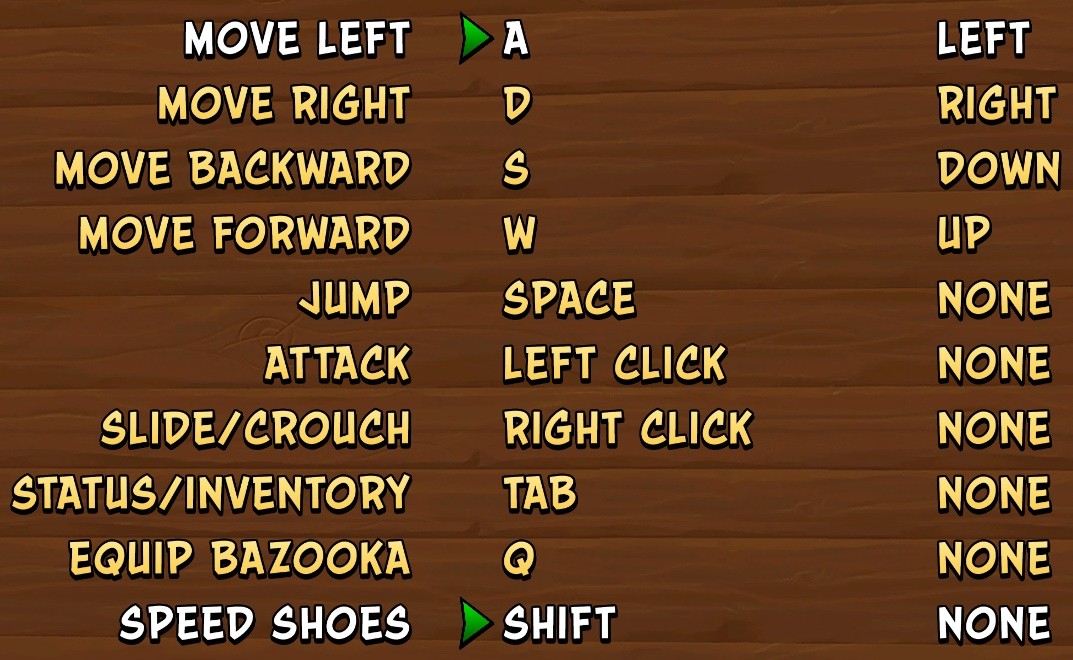
Default PC Controls
- Move Forward: W
- Move Backward: S
- Move Left: A
- Move Right: D
- Jump: Space
- Spin / Attack: Left Mouse Button
- Slide / Crouch: Right Mouse Button
- Status / Inventory: Tab
- Equip / Aim Fruit Bazooka: Q
- Speed Shoes / Run Faster: Shift
These are the basic PC bindings, but not every move is available in every game. Crash 1 is mostly movement, jumping, and spinning. Crash 2 adds more movement tools like sliding and body slamming. Crash 3 adds the most extra controls through boss rewards, vehicles, underwater sections, and flying stages.
Movement
Movement uses WASD. Crash is a very timing-heavy platformer, so small adjustments matter more than holding a direction too long.
- W moves forward.
- S moves backward.
- A moves left.
- D moves right.
Some stages are side-scrolling, while others move toward or away from the camera. The same controls apply, but depth perception becomes part of the challenge, especially in bridge, chase, and narrow-platform levels.
Jump
Space is your jump button. You use it for normal jumps, crate bouncing, enemy stomps, bonus paths, and platforming gaps.
- Space: Jump
- Space twice: Double Jump in Crash 3 after unlocking it
In Crash 3, jump can also change function in special stages. For example, it can be used for fast swimming underwater or rolling while piloting, depending on the level type.
Spin / Attack
Left Mouse Button is the basic attack input. In normal stages, this makes Crash spin.
- Left Mouse Button: Spin / Attack
- Surfboard levels: Attack can work as a boost
- Crash 3 upgrade: Death Tornado Spin uses repeated Spin inputs after it is unlocked
Spin is useful for enemies and crates, but it is not always safe. TNT, Nitro, armored enemies, and spiked enemies should be handled carefully.
Slide, Crouch, and Body Slam
Right Mouse Button handles crouch, slide, and body slam depending on what Crash is doing.
- Standing still: Right Mouse Button makes Crash crouch.
- While running: Right Mouse Button makes Crash slide.
- While airborne: Right Mouse Button performs a body slam / belly flop in games where that move is available.
This is much more important in Crash 2 and Crash 3 than in the first game. If a jump feels just out of reach, the answer is often a slide jump instead of a normal jump.
Slide Jump
Slide Jump is one of the most useful movement tricks in Crash 2 and Crash 3.
- Start moving.
- Press Right Mouse Button to slide.
- Press Space during the slide.
This gives you more distance than a normal jump and is especially useful for time trials, relic runs, bonus stages, and awkward platform gaps.
Body Slam / Belly Flop
Body Slam is done by jumping first, then pressing the slide/crouch input while in the air.
- Press Space to jump.
- Press Right Mouse Button while airborne.
Body Slam is mainly used to break certain crates or hit the ground hard. It becomes a bigger part of the moveset in Crash 2 and Crash 3.
Status / Inventory
Tab opens the status or inventory display.
- Tab: Status / Inventory
This is where you can check things like lives, Wumpa fruit, and crate progress depending on the game and level.
Crash Bandicoot 1 Controls
Crash Bandicoot, the first game in the trilogy, has the simplest moveset. It is mostly about clean movement, careful jumps, and well-timed spins.
- Move: WASD
- Jump: Space
- Spin: Left Mouse Button
- Status / Inventory: Tab
Crash 1 is stricter because it does not lean on the later games’ movement tricks. You cannot solve every awkward gap with a slide jump or double jump, so positioning matters more.
Crash Bandicoot 2 Special Controls
Crash Bandicoot 2: Cortex Strikes Back adds the moves that make Crash feel more flexible.
- Slide / Crouch: Right Mouse Button
- Slide Jump: Slide, then press Space
- Body Slam / Belly Flop: Right Mouse Button while airborne
- Surfboard Boost: Spin / Attack input during surfboard levels
- Jet Pack Levels: controls change for flying forward and backward
Crash 2 is where slide jumping becomes essential. If you are struggling with longer gaps, learn this move early.
Crash Bandicoot: Warped Special Controls
Crash Bandicoot: Warped has the most special controls in the trilogy. It adds boss-unlocked powers, vehicles, underwater stages, and flying sections.
- Double Jump: press Space twice after unlocking it from Dingodile.
- Death Tornado Spin: repeatedly press Spin after unlocking it from N. Tropy.
- Fruit Bazooka: use Q after unlocking it from N. Gin.
- Speed Shoes: use Shift after unlocking them from Neo Cortex.
- Motorcycle / Jet Ski: the speed input works as acceleration.
- Underwater Levels: jump can be used for faster swimming.
- Flying Stages: normal buttons may become roll, fire, air brake, or machine gun controls depending on the stage.
Crash 3 is the game where checking your bindings matters most. The same key can mean different things depending on the level type.
Fruit Bazooka
The Fruit Bazooka is a Crash 3 power-up unlocked after defeating N. Gin.
- Equip / Aim Bazooka: Q
- Use: aim and shoot Wumpa fruit at distant crates, enemies, or switches
It is mostly used for long-range crate breaking and safer enemy hits. It is not available from the start of the game.
Speed Shoes
Speed Shoes are unlocked in Crash 3 after defeating Neo Cortex.
- Speed Shoes / Run Faster: Shift
- Best use: time trials and relic runs
- Vehicle use: acceleration in some vehicle stages
Speed Shoes are mainly for relic hunting. Once you start chasing Gold or Platinum relics, sprinting becomes a major part of your routes.
Vehicle and Special Stage Controls
Some levels change what your buttons do. This is especially common in Crash 3.
- Surfboard: Spin / Attack can work as boost.
- Jet Pack: movement changes to flying controls.
- Motorcycle: Speed input works as acceleration.
- Jet Ski: Speed input works as acceleration.
- Underwater: Jump can help with fast swimming.
- Flying stages: buttons can become roll, fire, air brake, or machine gun controls.
If a vehicle level feels strange, it is probably because the game has reassigned one of your normal actions for that stage.
Useful Move Combos
- Slide Jump: move, press Right Mouse Button, then press Space.
- Body Slam: press Space, then Right Mouse Button in the air.
- Long Jump: crouch or slide, then jump.
- Slide Spin: slide, then spin during the slide.
- Double Jump: press Space twice in Crash 3 after unlocking it.
- Death Tornado Spin: repeatedly press Spin in Crash 3 after unlocking it.
- Sprint: hold Shift in Crash 3 after unlocking Speed Shoes.