

All of the key bindings used in NBA 2K22 are listed in the guide below. You can change your control settings at any time, whether you’re on the main menu or in the middle of a game. To do so, open the settings menu and select Controls (press ESC while in-game).
PC Keyboard Controls
Directional Movement
- W – Move player up
- A – Move player left
- S – Move player down
- D – Move player right
Offense
- NumPad 1 – Bounce pass
- NumPad 2, 4, 6 & 8 – Dribbling moves according to where you want to dribble
- NumPad 3 – Alley-Oop
- Spacebar – Chest pass
- Enter – Sprint
- Left Shift – Backdown or post-up
- NumPad 5 – Shoot
- Tab – Call pick
- Note: You can also use NumPad 2, 4, 6, and 8 for the shoot if you pressed the key/s longer.
Defense
- Spacebar – Switch players
- Enter – Sprint
- NumPad 3 – Jump or block
- NumPad 5 – Steal
- NumPad 2, 4, 6 & 8 – Intense defense
Game Menu
- Arrow keys – Menu navigation
- Spacebar – Select
- NumPad 1 – Go back
- NumPad 2 – Continue
- NumPad 3 – Apply changes
- NumPad 4 – Load default
- Escape – Exit
Image Version;
You can customize key mappings to Actions by selecting the key you want to adjust and pressing ENTER.
DEFAULT BASIC CONTROLS

BASIC OFFENSE CONTROLS

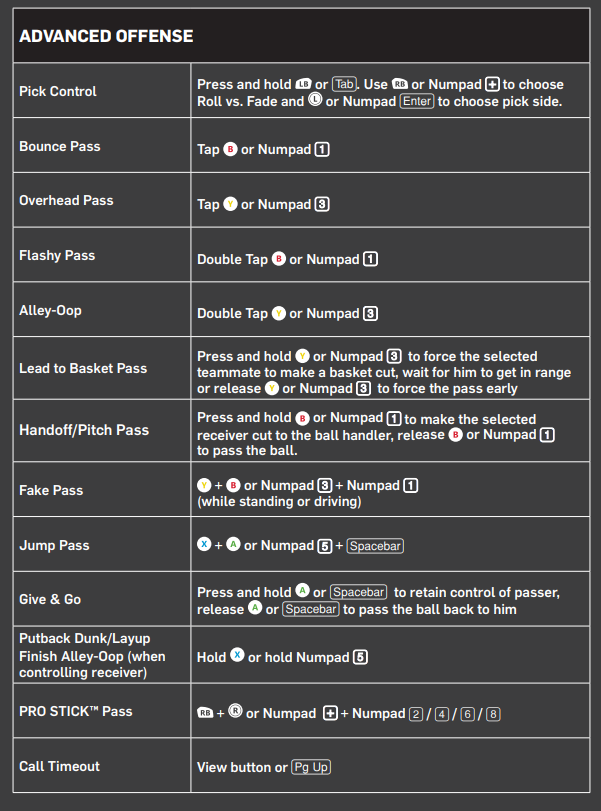
ADVANCED OFFENSE CONTROLS